Antivirus · Independent review
Avast Premium Security, examined: what the paid tier actually gives you
Advertising disclosure
This page is funded by advertising. Links and buttons labelled partner link are commercial: if you buy after following one, Ayvag Plus s.r.o. is paid a commission by the vendor or its affiliate network. You pay no more because of it, and no commission has bought a single sentence of the assessment below. We do not receive, review or approve any copy from the advertiser. Where we think the product is a poor fit, we say so. Our editorial policy sets out what we refuse to publish.
Avast’s paid consumer antivirus is widely advertised as an “all-in-one” suite. It is a capable protection product — but several things people expect to find in it are sold separately. Here is what the tier contains, how the technology works, what the independent labs say, and the reasons you might reasonably decide against it.
All figures, feature lists and prices on this page are subject to change by the vendor at any time, and differ by country and by platform. Where anything here diverges from Avast’s own documentation or checkout page, the vendor’s own information prevails. Check before you pay.
1. Why a paid tier exists at all
Every current desktop operating system ships with some malware protection. Windows has Microsoft Defender Antivirus built in and switched on by default; macOS has XProtect and Gatekeeper working quietly underneath. Neither costs anything. So the honest first question is not “which antivirus is best” but “do I need to buy one at all”.
The case for a paid suite is not that the free tools do nothing. It is that a paid product bundles a handful of adjacent controls — a configurable firewall, ransomware-specific folder protection, e-mail and web filtering, a sandbox, webcam permissions — into one place with one interface and one support contact. For a household that is never going to configure Windows Firewall rules by hand, that consolidation has real value. For a technically confident user who already patches promptly and keeps offline backups, the marginal gain is smaller.
The threat side of the argument is usually overstated in advertising, so let us keep it factual. European Union Agency for Cybersecurity (ENISA) threat-landscape reporting has, over recent editions, consistently placed ransomware, social engineering and data compromise among the most prominent threat categories affecting European users and organisations. What that does not tell you is any personal probability of being hit, and anyone quoting you a precise number for that is guessing. We are not going to invent one.
What we will not do on this page
No invented statistics, no countdown timers, no “9.8/10” score we made up, no reader testimonials we cannot show you, and no promise that any product will keep you safe. If you see a claim here, it is either something we can point at a source for, or it is explicitly labelled as our opinion.
2. What is included — and what is not
This is where most write-ups about Avast Premium Security go wrong, including an earlier version of this page. The tier is a protection suite. It is not the whole Avast catalogue.
Broadly, Avast Premium Security is built around the core anti-malware engine plus the protection features Avast layers on top of it: real-time file, web, e-mail and behaviour shields; ransomware protection that restricts which applications may write into folders you nominate; an enhanced two-way firewall; Real Site, which is Avast’s defence against DNS hijacking taking you to a spoofed bank; a sandbox for opening something suspicious in isolation; Wi-Fi Inspector for finding weak settings on your own network; webcam access control; a remote-access shield; a sensitive-data shield; and a file shredder.
What it does not include, despite how often it is described as if it did:
- A VPN. Avast SecureLine VPN is a separate Avast subscription. It is bundled into higher packages such as Avast One and Avast Ultimate — not into Avast Premium Security.
- A password manager. Avast retired its standalone Passwords product some years ago and directed users to browser-based password managers instead. There is no password vault in this tier.
- A PC tune-up utility. Cleaning junk files, managing startup items and updating drivers is Avast Cleanup Premium, again a separate product found in the Ultimate bundle.
- Cloud backup or identity monitoring. These belong to other products in Gen Digital’s range.
None of that makes Premium Security a bad product. It makes it a differently scoped one than the marketing shorthand suggests, and it matters because the “it replaces four subscriptions” argument — which the previous version of this article made — is not true of this tier.

Check the current package and price
Feature lists and promotions change. The vendor’s own page is the only authoritative source for what is in the box today.
See Avast Premium Security at the vendorPartner link · advertisementAyvag Plus s.r.o. earns a commission if you buy through this link. It costs you nothing extra and does not affect the price the vendor shows you.
3. How the protection engine decides
“Antivirus” is a museum word. Nothing modern relies on a list of virus signatures alone. What actually happens when you double-click a file is a short pipeline of independent checks, any one of which can stop it.
First, the signature check: a hash or pattern comparison against known-bad code. This is fast, cheap and useless against anything new. Second, static heuristics: the file is examined without being run, looking for the structural tells of packed, obfuscated or self-modifying code. Third, a reputation lookup: how many other machines have seen this file, how old is it, who signed it, does the signature chain hold. A brand-new unsigned executable that three people worldwide have ever run is treated very differently from a five-year-old signed installer. Fourth — and this is the part that earns the licence fee — behaviour monitoring, which watches the program while it runs and intervenes when it starts doing things that legitimate software does not do: enumerating and rewriting documents, deleting volume shadow copies, injecting into other processes, disabling security services.
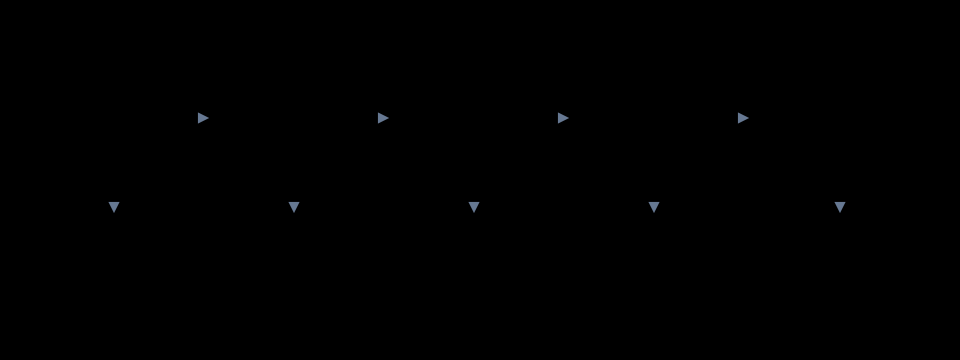
Two practical consequences follow. One: a detection rate quoted without a false-positive rate is meaningless, because you can catch everything by blocking everything. Two: because step five only acts once something is already running, no vendor can honestly promise that nothing will ever execute on your machine. Be suspicious of any that implies otherwise.
We go into more depth on this in how antivirus protection actually works.
4. Where infections actually come from
Consumer infections overwhelmingly arrive through a small number of routes, and most of them involve the user being persuaded to do something rather than a silent remote exploit. An attachment or a link in an e-mail or a message. A cracked application, a “codec”, a game cheat, or an installer downloaded from a site that is not the developer’s. A compromised or outright fake website. A removable drive. And, less commonly at home but very commonly in small businesses, an internet-facing service — remote desktop above all — that is unpatched or protected by a weak password.

5. The product is one layer, not the wall
The single most useful idea in consumer security is also the least marketable: no control is expected to hold on its own. Security software sits inside a stack that includes your router, your operating system updates, your browser, your password habits and your backups. Buying the suite and skipping the rest buys you less than you think.

6. Ransomware, specifically
Ransomware deserves its own section because it is the one category where the difference between “detected” and “detected in time” is the difference between an inconvenience and losing a decade of photographs.
Avast’s Ransomware Shield takes the folder-permission approach: you nominate the folders that matter, and only applications on an allowed list may modify files inside them. Anything else that tries is blocked and you are prompted. This is a genuinely sensible design, and it is one of the clearer reasons to prefer a paid tier over a bare free scanner. It is also, by construction, something you have to configure — the default folder set will not necessarily match where you actually keep things.

Which brings us to the uncomfortable part of any antivirus review: the most effective anti-ransomware measure available to a home user is a backup that is disconnected from the machine, and it costs less than most security subscriptions. A suite reduces the chance you ever need it. It does not replace it.
7. Phishing and web filtering
Web and e-mail filtering work largely from reputation and blocklists: a URL is checked against known-bad lists and heuristic rules before the page loads. This catches a great deal, and it is particularly valuable for less confident users. Its structural weakness is timing — a domain registered forty minutes ago has no reputation to look up, and phishing campaigns are built around exactly that window.
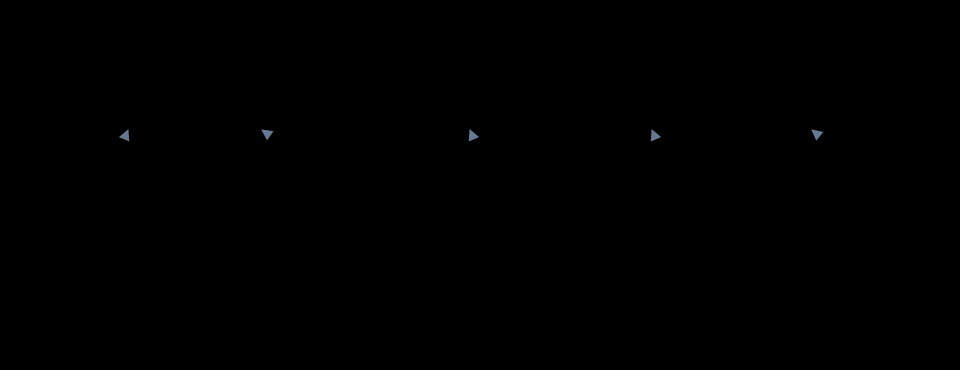
So the skill still matters. The only part of a web address that tells you whose site you are on is the registered domain: the last two labels before the first single slash. Everything to the left of it is chosen by whoever owns that domain, and can say anything at all.
Ready to look at the product itself?
You will get the vendor’s current feature table, the real price in your country, and the terms that actually apply.
Go to Avast Premium SecurityPartner link · advertisementAyvag Plus s.r.o. earns a commission if you buy through this link. It costs you nothing extra and does not affect the price the vendor shows you.
8. Devices, platforms and licences
Avast Premium Security is sold in a single-device version and a multi-device version, with the multi-device licence covering a set number of installations across Windows, macOS, Android and iOS. The exact device count, and the price per year, are set by the vendor and vary by region and by promotion, so we are not going to print a number here that will be wrong next month.
The point that is worth printing is this: the feature set is not the same on every operating system. The Windows build is the most complete. The macOS build has a different and smaller feature list. On Android and especially on iOS, platform sandboxing restricts what any security app is permitted to do, and the mobile apps are correspondingly different products in practice — closer to web filtering, network checks and anti-theft than to a desktop anti-malware engine. If you are buying a multi-device licence primarily for the phones, read the per-platform feature table first.

9. Price, renewal and your EU rights
Two things about consumer security software are near-universal across the industry, and both are worth knowing before you click buy.
First, the advertised price is usually a first-term price. Renewal is typically at a higher rate, and subscriptions typically renew automatically unless you turn that off. This is legal and disclosed, but it is disclosed in the terms rather than on the banner, and it is the single most common source of complaints about every vendor in this market, not just Avast.
Second, if you are buying as a consumer in the EU, Directive 2011/83/EU gives you a fourteen-day right of withdrawal on distance contracts. For digital content delivered immediately there is an important carve-out: you can be asked to acknowledge that starting the download causes you to lose that right, and vendors routinely ask exactly that. Separately from the statutory right, security vendors commonly offer their own money-back window. Check which one you are actually being offered at checkout, because they are not the same thing and the conditions differ.
We cover this in more detail, including what to check before paying, on the price, renewal and refunds page.
10. Reading independent test results
Two European laboratories dominate independent consumer antivirus testing and publish their methodology and results openly: AV-TEST in Magdeburg and AV-Comparatives in Innsbruck. Avast products are regularly included in both, and have generally performed well in recent years, including recognitions in AV-Comparatives’ annual summary reports.
What we are deliberately not doing is quoting you a specific score. Test results are published per round, they move, and a figure copied into an affiliate page in September tells you nothing useful in March. If protection scores are what will decide your purchase, spend ten minutes on the labs’ own sites and read the current round yourself. Three things to look at when you do:
- Protection and false positives together. A product that blocks 100% of malware and also blocks your accounting software is not a good product.
- Which test. A “real-world protection” test, which uses live URLs, is a much better proxy for your experience than a static malware-set scan.
- Consistency across rounds. One excellent month is noise. Six consecutive solid rounds is a signal.
11. The arguments against it
An advertising-funded page that lists no drawbacks is not worth reading. Here are the real ones.
Microsoft Defender is free and no longer a joke
Windows ships with Defender enabled, and in independent testing it has for several years scored respectably against paid competitors. For a careful user on an up-to-date Windows machine, the honest comparison is not “Avast versus nothing”, it is “Avast versus a free product that is already running”. What you are paying for is the extra layer — the configurable firewall, the ransomware folder rules, the sandbox, the webcam permissions, the single console — not the existence of malware scanning.
The Jumpshot affair, and why it still matters
This is a matter of public record and any honest review has to mention it. Avast operated a subsidiary called Jumpshot which packaged and sold data derived from the browsing activity of Avast users. Following investigative reporting, Avast announced in January 2020 that it was winding Jumpshot down. In February 2024 the United States Federal Trade Commission announced a settlement over the practice: Avast agreed to pay 16.5 million US dollars and was barred from selling or licensing browsing data from its own products for advertising purposes, alongside further compliance obligations.
Our reading: the specific conduct was ended years ago and is now the subject of a binding order, and Avast is far from the only security vendor to have faced data-handling scrutiny. But if the reason you are buying security software is that you do not want to be a product, that history is legitimately part of the decision, and you should read the current privacy policy of any vendor you are considering before subscribing.
Upsell pressure and bundle confusion
Because the VPN, the password manager and the cleanup tool are separate products, the interface will tell you about them. Whether that is helpful or irritating is a matter of temperament, but you should expect it.
You may be buying what you already have
If you already subscribe to a standalone VPN, already use a password manager, already keep an offline backup and already patch promptly, the incremental protection a suite adds is real but narrower than the sales page suggests.
12. Who it suits, and who it does not
| If this is you | Our view |
|---|---|
| A household with several Windows PCs and a mix of phones, nobody technical, and nobody who will ever configure a firewall rule | A reasonable purchase. The consolidation and the ransomware folder rules are the value, and a multi-device licence is the sensible shape. |
| One modern, patched Windows laptop, a cautious user, an offline backup already in place | Defender plus your existing habits is a defensible choice. Buy the suite if you want the extra controls, not because you have been told you are unprotected. |
| You mainly wanted the VPN and the password manager | Wrong product. Those are not in this tier — look at Avast One or Avast Ultimate, or buy them separately from whoever you prefer. |
| Small business with remote desktop exposed to the internet | Fix the exposure first. No consumer antivirus is the right control for that problem. |
| You object on principle to the Jumpshot history | A fair position. There are other reputable vendors, and the labs test them too. |
See the current offer
Pricing, the device count and the exact feature list are the vendor’s to set — confirm all three on their page before you pay.
Visit Avast Premium SecurityPartner link · advertisementAyvag Plus s.r.o. earns a commission if you buy through this link. It costs you nothing extra and does not affect the price the vendor shows you.
13. Corrections to this page
Corrected on 21 September 2026
An earlier version of this article, published before the current editorial review, contained several claims that were wrong. We have corrected them and we are recording what changed rather than quietly editing:
- It said Avast Premium Security includes a VPN. It does not. Avast SecureLine VPN is a separate subscription, included in higher bundles.
- It said the suite includes a password manager with an encrypted vault and browser auto-fill. It does not; Avast retired its standalone Passwords product some years ago.
- It said the suite includes a performance optimiser that cleans junk files and manages startup programs. That is Avast Cleanup Premium, a separate product.
- It referred to a microphone privacy shield. Avast provides webcam access control; we could not substantiate a separate microphone shield in this tier, so the claim is gone.
- It advertised a specific “60% off” discount. Discounts are set by the vendor, vary by country and expire. We no longer state a percentage anywhere on this site.
- It asserted that independent labs have “consistently ranked Avast among the top performers” on detection, false positives and system impact. That overstated what the published results support. We now say Avast is regularly tested by AV-TEST and AV-Comparatives and has generally performed well, and we send you to read the current round.
- It was framed as a “reader-submitted story”. It was not. The framing, and the site section calling itself “Reader Stories”, have been removed.
- It omitted the Jumpshot matter and the 2024 FTC settlement entirely. Both are now covered.
If you find a further error, write to info@boricva.online and we will correct it in line with our corrections procedure.
14. Sources
- Avast product, comparison and support pages — the authoritative source for the current feature list, tier comparison and per-platform differences. avast.com
- US Federal Trade Commission, press release and consent order concerning Avast Limited and the sale of browsing data, February 2024. ftc.gov
- AV-TEST Institute, published consumer Windows, macOS and Android test rounds. av-test.org
- AV-Comparatives, real-world protection tests, false-alarm tests and annual summary reports. av-comparatives.org
- ENISA Threat Landscape, annual editions, on prevailing threat categories in the EU. enisa.europa.eu
- Directive 2011/83/EU of the European Parliament and of the Council on consumer rights, Articles 9 and 16, on the right of withdrawal and its exceptions for digital content. eur-lex.europa.eu
- Gen Digital Inc. corporate information on the 2022 combination of Avast and NortonLifeLock. gendigital.com
Assessments and opinions in this article are those of the named author and of Ayvag Plus s.r.o.. Facts were checked against the sources above on 21 September 2026. Software changes; where this page and the vendor’s documentation disagree, the vendor’s documentation is correct and this page is out of date — please tell us.